All employees must submit the weekly hours at the end of the week, this way the manager can review in a weekly basis his managees time entries.
Instructions for submitting your week
Step 1: Go to the "Time Entries" menu
- After the log-in in Engage go to the "Time entries" menu.
- If you manage other employees, be sure to be on the "My timesheets" tab.
Step 2: Review you week with attention
- Be sure you added all the time entries for the week.
- Check if you added the correct daily lunch pause as oriented by your company.
- If you have any questions please talk to your manager before submitting your week.
Step 3: Submitting the week
- To submit the week just click in the "Submit week" button.
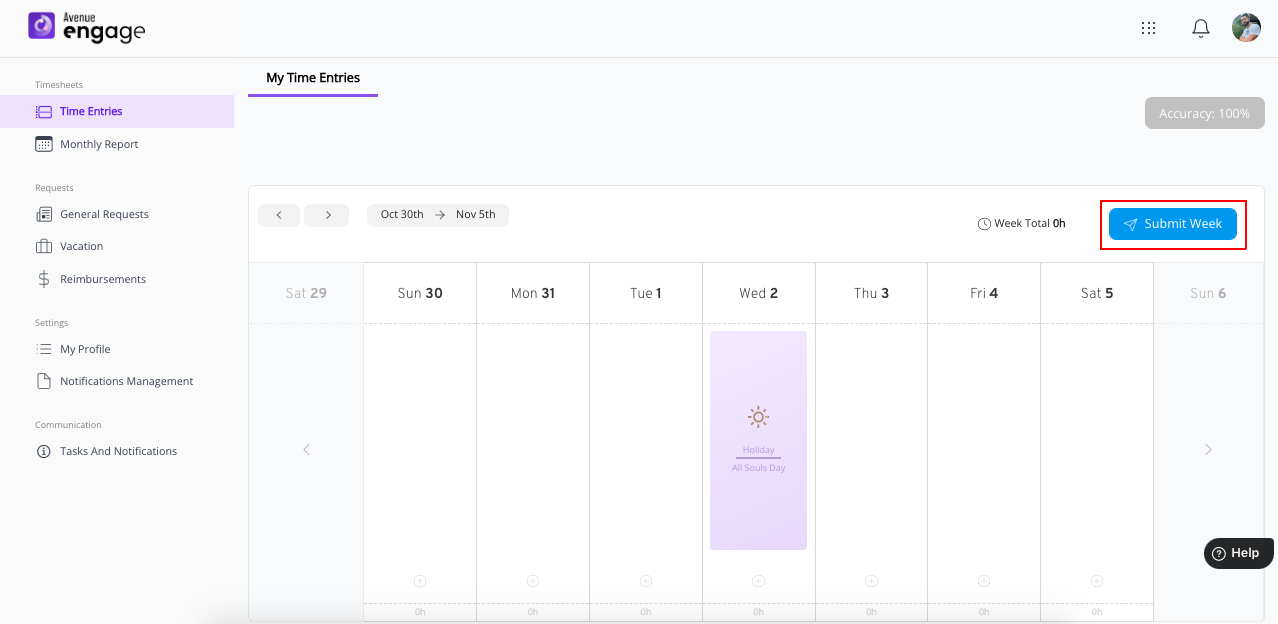
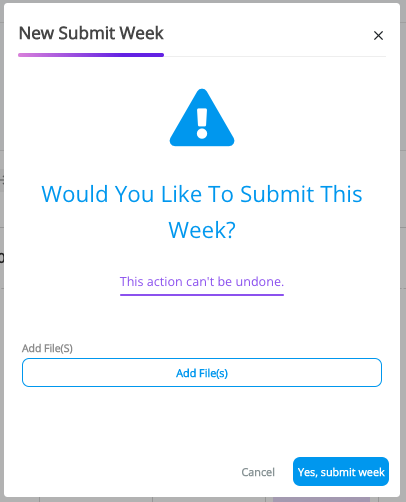
- After clicking to submit the week a confirmation message will be displayed, click "Yes, submit week" to send your week for the manager review.
- If your week is successfully submitted a success message will be displayed.
After submitting the week status will be "Pending" and you will not be able to make changes to it, however if you do need to make changes please talk to your manager.
Was this article helpful?
That’s Great!
Thank you for your feedback
Sorry! We couldn't be helpful
Thank you for your feedback
Feedback sent
We appreciate your effort and will try to fix the article